PRODUCT 02 | LUBAN ENGINEERING APP PLATFORM

Give every engineering scenario its own Engineering App

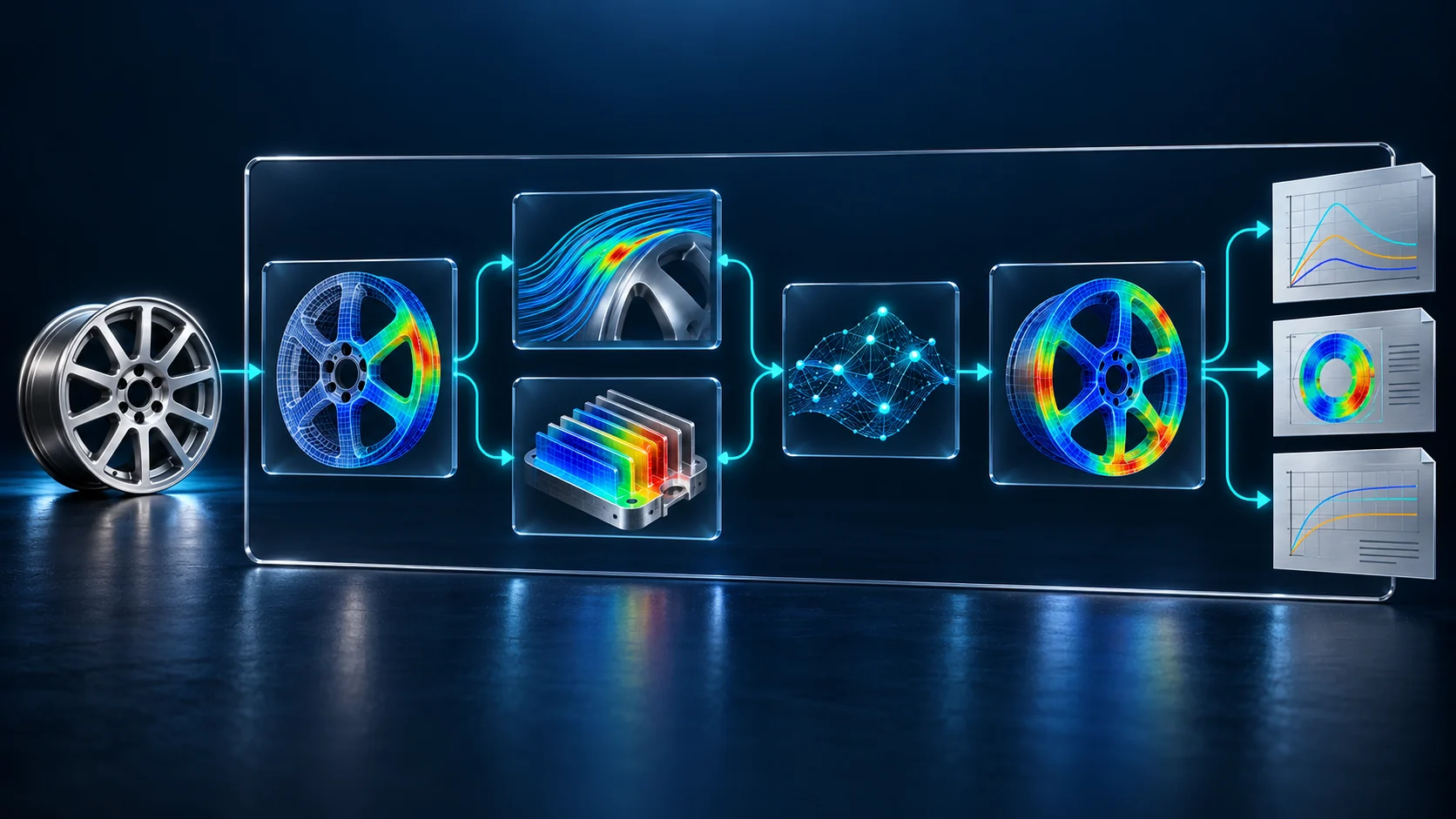
LUBAN Builder turns a Trusted Engineering Utility into an Engineering App. LUBAN User runs the App to complete real engineering work.

01 | PRODUCT DEFINITION

Turn a Trusted Engineering Utility into an Engineering App

Package a Trusted Engineering Utility as an Engineering App that is runnable, reusable, and ready for acceptance

WHAT LUBAN DOES

LUBAN is the Engineering App Platform. It takes in a complete Trusted Engineering Utility, then builds, validates, publishes, runs, composes, and governs the resulting App.

Build
Publish
Run
Compose
Govern

You are not building a page. You are codifying an engineering capability.

ENGINEERING APP FORMULA

  1. 01

    Input boundaries

    Objects, parameters, conditions, and constraints

  2. 02

    Methods & models

    Expert methods, computational models, and rules

  3. 03

    Execution workflow

    Data preparation, solving, and task orchestration

  4. 04

    Validation rules

    Thresholds, checks, and acceptance criteria

  5. 05

    Evidence outputs

    Results, records, reports, and supporting evidence

Engineering App

A runnable unit of engineering capability built for a specific scenario, with clear boundaries and complete evidence

RunnableReusableAcceptance-ready
02 | ENGINEERING APP EXAMPLE

How a 13° wheel-impact Utility becomes an Engineering App

Follow a Trusted Engineering Utility from input boundaries, methods, and evidence through release governance and the task interface

LUBAN Builder | CAPABILITY BUILDING

Package the impact-validation Utility as an Engineering App

LUBAN Builder takes in the complete Trusted Engineering Utility—its inputs, workflow, criteria, and evidence—then defines a product boundary that can be validated, released, and evolved

Placeholder for the LUBAN Builder wheel 13 degree impact validation method orchestration interface
BUILD SIDE | METHOD ORCHESTRATION
01 · INPUTSGeometry or mesh, material, impactor, speed and angle, test data
02 · WORKFLOWModel check → impact solve → response extraction → test correlation
03 · CRITERIADeformation mode, failure location, key responses, and correlation error
04 · DELIVERABLESImpact contours, response curves, correlation records, and an acceptance report

ENGINEERING APP SPECIFICATION

ENGINEERING APP

Wheel 13° Impact Validation App

Define the task boundary, method version, and evidence output

TASK CONTRACT
EVT-WHEEL-13-01
METHOD VERSION
V1.0
APPLICABILITY
Specified wheel | 13° impact condition
CAPABILITY STATUS
Method example
EVIDENCE OUTPUT
EVD-WHEEL-13-01

LUBAN User | TASK EXECUTION

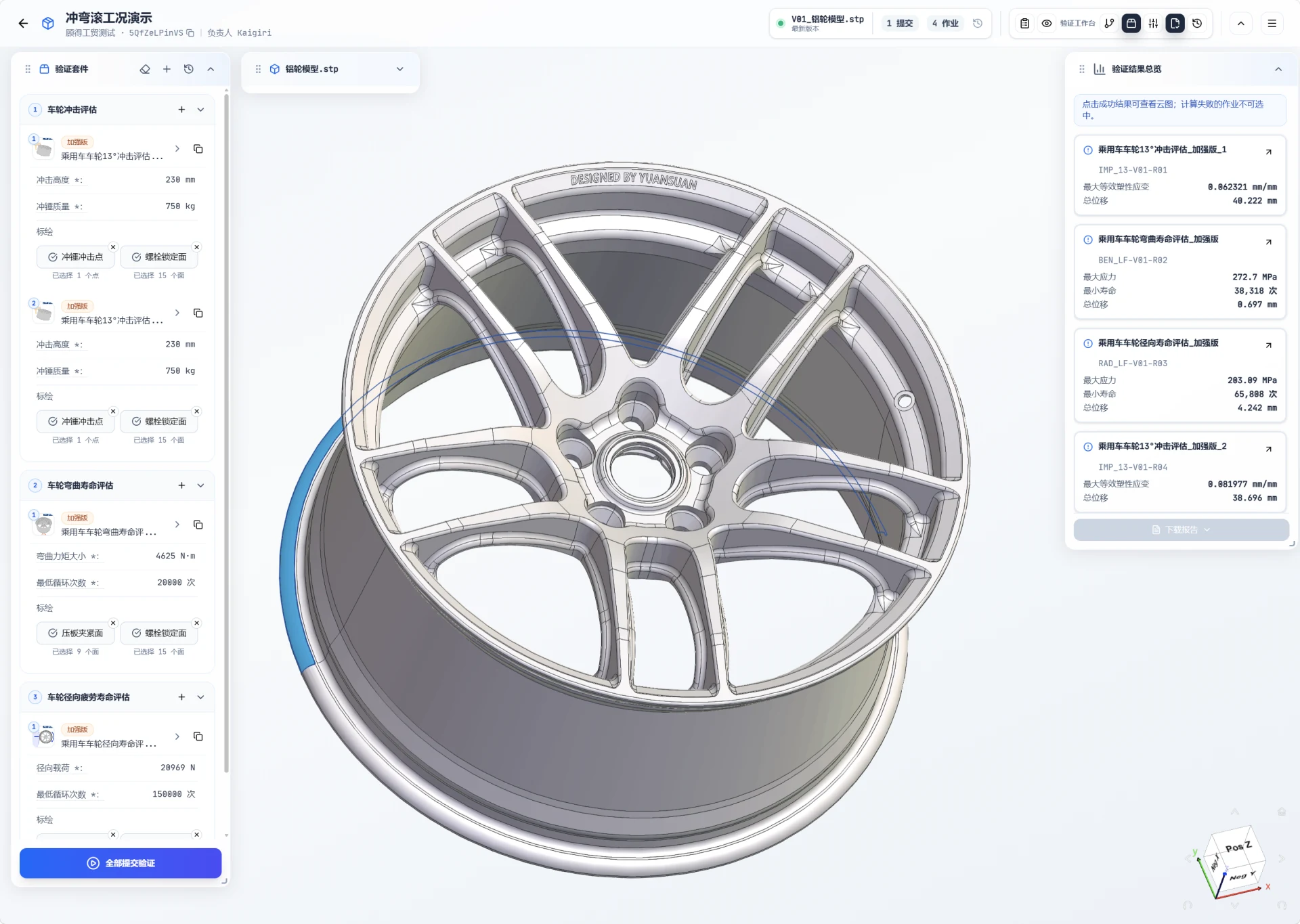
Use an Engineering App to complete an impact check

LUBAN User does not have to rebuild the solver toolchain. Provide the inputs for the wheel and load case, then follow a validated path to a conclusion and its evidence.

Wheel 13 degree impact validation Engineering App method example interface
METHOD EXAMPLE · NOT CUSTOMER DATA
  1. 1Choose the wheel and impact condition
  2. 2Provide the required inputs
  3. 3Run the published method
  4. 4Review the conclusion and evidence
03 | TWO-SIDED SYSTEM

Engineering Apps evolve as they are built and run

LUBAN Builder turns a Trusted Engineering Utility into a released Engineering App. LUBAN User runs real tasks and feeds the results back, so the capability keeps improving.

ENGINEERING APP

  1. LUBAN Builder

    Define the scenario, inputs, and operating envelope

    Set the task, required inputs, and valid operating conditions

    01 · DEFINE

    Create the scenario contract

    LUBAN User

    Find the App that actually fits the task

    Know where it applies—and where it does not

  2. LUBAN Builder

    Connect models, tools, workflows, and rules

    Organize a method that spans people, software, and multiple steps

    02 · BUILD

    Create the executable method

    LUBAN User

    Enter only the information this task needs

    No need to install or understand the underlying toolchain

  3. LUBAN Builder

    Validate results and set versions and access

    Establish baselines, approvals, and release scope

    03 · PUBLISH

    Release a governed product

    LUBAN User

    Run an organization-approved version

    Know the source, version, and validation status

  4. LUBAN Builder

    Run the full engineering method behind the scenes

    Coordinate models, software, compute, and rules

    04 · RUN

    Deliver results and evidence

    LUBAN User

    Get an expert conclusion—not just raw data

    Receive key metrics, engineering judgment, evidence, and a standard report

  5. LUBAN Builder

    Improve the method through real-world use

    Discover new boundaries and opportunities from runtime feedback

    05 · EVOLVE

    Evolve into a living asset

    LUBAN User

    Get a more reliable experience with every release

    Each version carries validated capability forward and addresses real issues

04 | TWO WORKSPACES

One Engineering App. Two purpose-built workspaces.

The build side handles the complete Trusted Engineering Utility. The run side focuses on the task at hand. Both workspaces operate on the same Engineering App.

LUBAN User workspace for results and evidence
LUBAN User | TASK EXECUTION

SAME ENGINEERING APP

Complete expert work in the language of the task

LUBAN User selects an Engineering App, provides the required inputs, and runs it to receive results, engineering rationale, and a standard report

  1. 01Choose an Engineering App
  2. 02Enter required inputs
  3. 03Run the published capability
  4. 04Review results & evidence
  5. 05Save or continue the decision
ENGINEERING SCENARIO
Wheel 13° impact validation
TASK CONTRACT
EVT-WHEEL-13-01
METHOD VERSION
V1.0
EVIDENCE OUTPUT
EVD-WHEEL-13-01
05 | TRUSTED CAPABILITY

Engineering Apps must do more than run—they must be governed

Applicability boundaries, method versions, execution history, and result evidence are built into every App, giving each task a trustworthy foundation

LUBAN Builder | CAPABILITY BUILDING

Define the boundaries of trusted use

01Define the operating envelope
02Control versions and access
03Set decision and reporting standards

TRUSTED ENGINEERING APP

Build validation, governance, and evidence into the Engineering App

Applicability

Know when the App applies

Governance

Run an approved version

Traceability

Preserve the full execution history

Evidence

Support explanation and review

LUBAN User | TASK EXECUTION

Get a trustworthy conclusion

01Confirm the task is a fit
02Run an organization-approved version
03Review the conclusion and its evidence

SHARED FOUNDATION

Unified Engineering AI Platform

Coordinate solvers, compute, engineering reasoning, and governance so Engineering Apps run reliably

Solving System

Computability

Make engineering problems solvable

Compute Platform

Scale

Run engineering workloads at scale

Engineering Foundation Model

Engineering Reasoning

Turn engineering intent into executable work

Trusted Execution Control Plane

Govern plans, execution, checkpoints, access, and accountability as a complete evidence chain

06 | PRODUCT HANDOFF

From trustworthy conclusions to trusted capabilities to accountable execution

GEWU captures a Trusted Engineering Utility. LUBAN packages it as a Trusted Engineering App. MOZI invokes it in context with a complete execution trail.

ONE ENGINEERING CAPABILITY | THREE PRODUCT ENTRIES

ENGINEERING CONTEXT STAYS INTACT

01 / Engineering Workspace

GEWU

Validate conclusions and capture a Trusted Engineering Utility

Preserve the inputs, workflow, operating boundary, and engineering evidence

STANDARD ARTIFACT

Trusted Engineering Utility

Input boundary | validation rules | evidence chain

02 / Engineering App Platform

LUBAN

CURRENT

Package the capability as a Trusted Engineering App

Carry the Trusted Engineering Utility forward, then package, validate, and publish it

STANDARD ARTIFACT

Trusted Engineering App

Task contract | method version | acceptance criteria

03 / Engineering Task Agent

MOZI

Keep the task moving and preserve an accountable execution record

Maintain the task thread while coordinating engineering capabilities and human checkpoints

STANDARD ARTIFACT

Task Result & Execution Record

Goal & plan | human checkpoints | result & evidence

GEWU makes conclusions trustworthy. LUBAN makes capabilities trustworthy. MOZI makes complex-task execution controlled and auditable.

A Trusted Engineering App can run directly. Hand persistent, complex work to MOZI with its context and evidence intact.

07 | GET STARTED

Start with a real engineering task or a proven method

Run an Engineering App in LUBAN AppStore, or apply for private access to LUBAN Builder

LUBAN Builder | CAPABILITY BUILDING

PRIVATE BETA

Turn a Trusted Engineering Utility into a Trusted Engineering App

Submit a Trusted Utility and a representative task. We will assess the product boundary, packaging value, and fit for private beta.

Trusted Engineering Utility
Product fit assessment
Trusted Engineering App

LUBAN User | TASK EXECUTION

AVAILABLE NOW

Find a Trusted Engineering App and complete the job

Browse AppStore by engineering object and task, confirm the capability boundary, and run the App

Engineering task
Trusted Engineering App
Conclusion & evidence